

Shopify Fashion PDP Stack: Variant Images, Combined Listings, and Virtual Try-On
Fix variant galleries and combined listings on Shopify fashion PDPs, then add virtual try-on. A practical stack guide featuring Rubik apps by Craftshift.

Your shopper taps “Navy.” The gallery still shows every colorway from the photoshoot.
They scroll past burgundy, cream, and black trying to find the dress they actually selected. Most won’t. They leave, or they buy the wrong shade and send it back. You lose the sale either way.
This is a gallery problem, not a persuasion problem. Before you ask shoppers to picture themselves in a garment, the page has to show the right color. Variant image mapping and color navigation come first. Personal preview comes after.
Craftshift builds Shopify stores and the Rubik app suite for fashion merchants. Two apps in that suite solve the most common PDP failures we see on apparel stores: Rubik Variant Images for gallery filtering and Rubik Combined Listings for cross-product color grouping. This guide walks through both, then covers where virtual try-on fits once the foundation is solid.
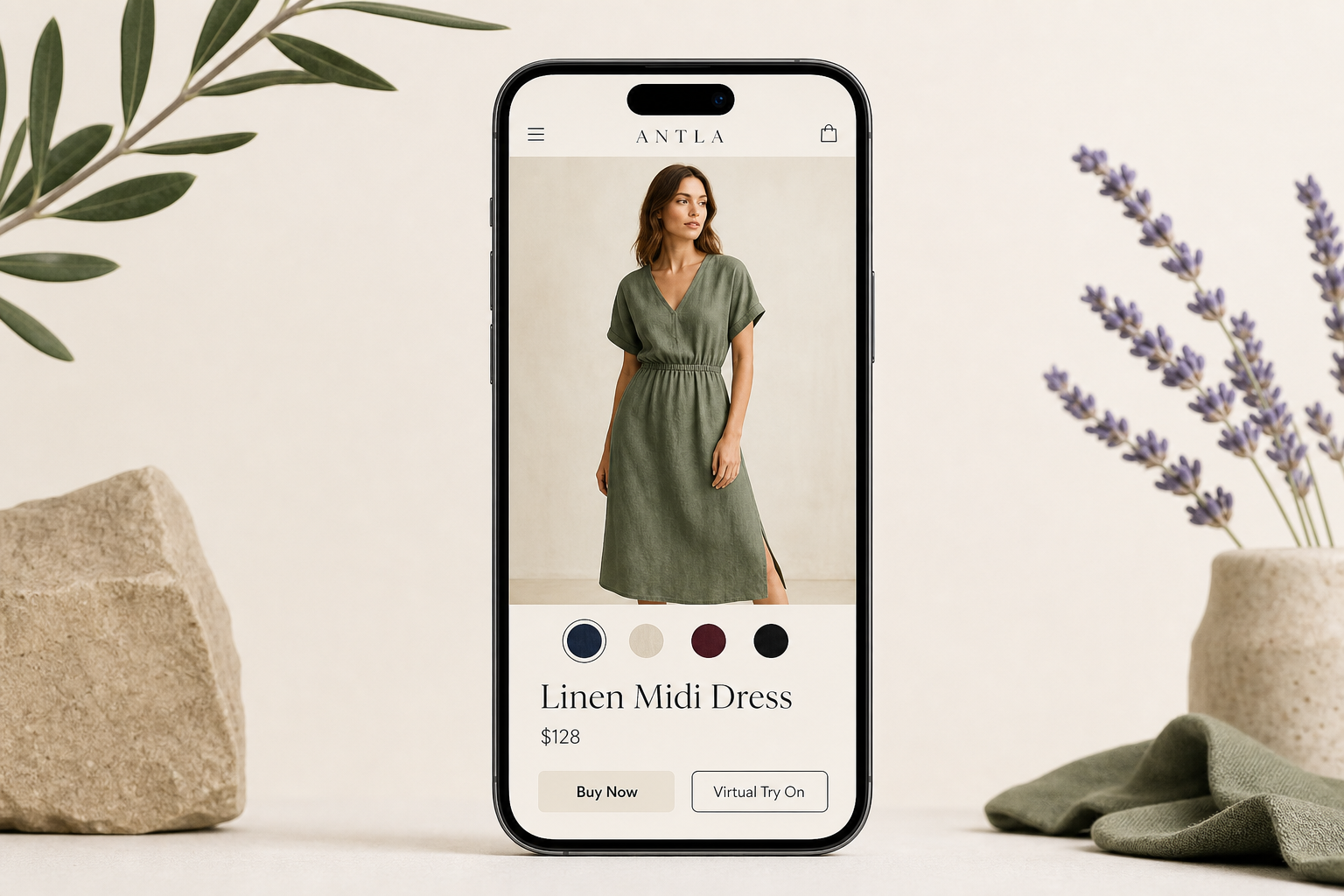
Fix the gallery and color navigation before you ask shoppers to picture themselves in the garment.
What Is a Complete Shopify Fashion Product Page Stack?
A complete Shopify fashion product page stack is three layers working together: variant image clarity so shoppers see the right color, combined product grouping so sibling colorways feel like one product, and virtual try-on so shoppers preview the garment on themselves. Each layer answers a different purchase question. Skip the first two and personal preview sits on top of a broken foundation.
Apparel returns stay stubbornly high. NRF and Happy Returns reported $890 billion in retail returns in 2024, with fit and appearance gaps driving much of fashion’s share. Baymard’s apparel UX research reinforces that product-page clarity directly affects whether shoppers feel confident enough to buy. A stack that fixes color confusion before checkout attacks the same return reason from a different angle than try-on alone.
For a broader PDP audit framework, see fashion product pages that convert before ads. For why messy variant data breaks apps silently, read your product setup is costing you.
Two Gallery Problems Every Apparel Shopper Hits on Your PDP
Every fit-sensitive purchase starts with color clarity. Your stack should answer these two questions before anything else.
1. “Am I looking at the right color?”
When a dress comes in eight shades, the gallery cannot show all of them at once. Shoppers need the images to filter when they pick a swatch. Without that, color accuracy fails before fit even enters the conversation.
Answer: Rubik Variant Images
2. “Where are the other colors?”
Some brands run each colorway as a separate Shopify product for SEO, inventory, or photoshoot logistics. That creates navigation friction: shoppers land on “Dress in Navy” and cannot find the burgundy version without backtracking through collections.
Answer: Rubik Combined Listings
Get the order right. Gallery clarity first, then color grouping. Personal preview comes once both pass a mobile QA.
Rubik Variant Images: Fix the Gallery Before Anything Else
Rubik Variant Images & Swatch solves the most common apparel PDP failure: mismatched variant images in the gallery.
Shopify’s default behavior assigns images to variants, but merchants rush the mapping step. A jacket in six colors ends up with 30-plus photos in one carousel. The shopper selects “Olive” and still scrolls past every other shade. They won’t scroll through 40 photos to find navy. They bounce.
Rubik fixes this by letting you assign multiple photos per variant and filtering the gallery to show only the selected variant’s images. It also replaces plain dropdowns with image swatches and color swatches on the variant picker, so shoppers tap the color they want and see the right photos immediately.
What makes it practical for growing catalogs:
- Multiple images per variant. Front, side, detail, on-body: each color gets its own gallery set.
- AI auto-assign. Bulk catalogs do not need manual mapping one SKU at a time. Plans include 50 to 50,000 AI-assisted assignments per month depending on tier.
- Theme-safe setup. Works with Online Store 2.0 themes and popular page builders without slowing the page. The app holds a 5.0 rating across 387 reviews on the Shopify App Store.
- Video and 3D model support for merchants who go beyond stills.
Why this matters downstream: Virtual try-on apps generate preview images from the product photo tied to the selected variant. If your gallery mapping is wrong, try-on renders the wrong color on the shopper. Fix variant images first. Clean variant data is a prerequisite for any visualization layer you add later.
Merchants praise the support team by name. One reviewer on a multilingual store noted the team resolved cross-language variant display issues quickly. Another called setup “incredibly easy” with helpful YouTube tutorials and fast live chat when a complex product needed help.
Rubik Variant Images pricing
| Plan | Price / month | Products | AI auto-assign / month |
|---|---|---|---|
| Free | $0 | 1 product | 50 images |
| Starter | $25 | 100 products | 500 images |
| Advanced | $50 | 1,000 products | 5,000 images |
| Premium | $75 | Unlimited | 50,000 images |
All plans include variant image swatches, free theme setup, and live chat support. Start free on a hero SKU, confirm the gallery filters correctly on mobile, then scale.
Rubik Combined Listings: When Each Color Is Its Own Product
Some fashion brands deliberately split colorways into separate Shopify products. Each color gets its own URL, its own photoshoot, its own inventory record. That is a valid strategy for SEO and warehouse logic. It creates a UX problem: shoppers cannot hop between colors without losing their place.
Rubik Combined Listings Swatch links separate products as variant siblings. Swatches appear on product pages and collection cards, so “Navy Dress” and “Burgundy Dress” feel like color options on one product, even though Shopify treats them as distinct listings.
What it handles:
- Product grouping with swatches on PDPs and collection cards
- Auto-sync of product info, stock levels, and archived status across grouped siblings
- Bulk grouping by title, tag, or metafield for large catalogs
- Out-of-stock display options: crossed out, hidden, or pushed to the end of the swatch row
- Subcategory groups for limited editions or seasonal drops
- Translations for multilingual stores via Translate & Adapt compatibility
- Works alongside Rubik Variant Images for stores that need both per-variant galleries and cross-product grouping
If each color lives as a separate product, combined listings keep shoppers moving between shades without backtracking through collections.
Native variants vs combined listings
| Situation | Native variants | Combined listings |
|---|---|---|
| 3–5 colors, one URL | Usually fine | Optional |
| 8+ colors, SEO per color | Awkward | Strong fit |
| Different inventory per warehouse | Hard to manage | Cleaner architecture |
| Separate photoshoots per colorway | Gallery chaos on one product | Grouped swatches across products |
Rubik Combined Listings pricing
| Plan | Price / month | Product groups | AI credits / month |
|---|---|---|---|
| Free | $0 | 5 groups | 100 |
| Starter | $10 | 100 groups | 1,000 |
| Advanced | $30 | 500 groups | 5,000 |
| Premium | $50 | 5,000 groups | 50,000 |
The app launched in early 2026 and already holds a 5.0 rating. Merchants highlight the AI bulk group creation tool and responsive support, including feature requests turned around within days.
The Third Layer: “How Will This Look on Me?”
Once the gallery shows the right color and shoppers can navigate between sibling products, one question remains. Product photos show a model. Shoppers need to see themselves. That is the visualization gap virtual try-on closes.
Answer: Virtual try-on, installed after the gallery passes QA.
Antla Virtual Try-On: The Confidence Layer
Antla AI Virtual Try-On is built exclusively for Shopify fashion brands. It carries Shopify’s Built for Shopify badge, installs through the App Store with no code, and works on Online Store 2.0 themes via app blocks you place in the theme editor.
The flow is straightforward. A shopper taps “Virtual Try On” on the product page, uploads a photo, and sees themselves wearing the selected garment. Antla Fast delivers results in seconds. Antla Pro takes longer and produces higher-fidelity output for detail-sensitive categories.
What merchants report:
- Roughly 35% higher conversion among shoppers who use try-on
- 3x more engagement on product pages with try-on enabled
- Meaningful return reduction when fit and appearance anxiety drove the original purchase hesitation
Treat those as directional, not guaranteed. Results vary by category, traffic quality, and how honest your PDP already is about fit.
Antla also captures emails at the try-on step (with Klaviyo sync), tracks shares in analytics, and connects with Attentive, Postscript, and Shopify Flow. The try-on moment becomes a remarketing asset, not just a one-time preview.
For evaluation criteria before you commit, see Shopify PDP conversion optimization for fashion brands. For the returns math, see how virtual try-on reduces returns before checkout and fashion returns reduction strategy on Shopify.
Setup Order That Actually Works
Install order matters. Gallery tools first, try-on last.
- Audit hero SKUs on mobile. Open your top 5 products on a phone. Select each color. Does the gallery update? Note every mismatch.
- Install Rubik Variant Images. Map images per variant. Enable image and color swatches on the picker. Use AI auto-assign if your catalog is large.
- Add Rubik Combined Listings if colorways live as separate products. Group siblings with swatches on PDP and collection cards.
- QA the gallery on 5 hero SKUs. Pick a color, confirm photos, check swatch behavior on collection pages. Do this before spending on try-on.
- Install Antla on highest-return, most visual SKUs. Place the try-on button near add-to-cart, not three scrolls down.
- Test the full mobile flow: pick color, confirm gallery, run try-on, add to cart. Shopify PDP conversion optimization has more on placement and measurement.
Most stores skip step 4. They fix the imagination problem and leave the basic color problem untouched.
Full Stack Pricing at a Glance
| App | Free tier | Entry paid plan | Best for |
|---|---|---|---|
| Rubik Variant Images | 1 product | $25/mo (100 products) | Gallery filtering and swatches |
| Rubik Combined Listings | 5 product groups | $10/mo (100 groups) | Separate products as color siblings |
| Antla Virtual Try-On | 7-day trial | $19.99/mo (100 try-ons) | Personal preview on hero SKUs |
A small store testing the full stack can start on free tiers for both Rubik apps plus Antla’s Trend plan after the trial. That is under $45/month for gallery clarity, color grouping, and try-on on your most important products. Avoiding two or three fit-related returns covers the cost.
For broader returns context, see fashion returns reduction strategy on Shopify.
Mistakes We See on Apparel PDPs
Launching try-on on a broken gallery. If selecting “Blue” still shows red product photos, try-on generates the wrong garment on the shopper. Fix mapping first.
Burying the try-on button. If it lives below three screens of brand story, nobody finds it. Place it next to add-to-cart where hesitation peaks.
Using combined listings without syncing inventory. Grouped products need accurate stock data across siblings. Rubik auto-syncs, but your source data has to be honest.
Enabling try-on on low-visual SKUs. Plain socks and basic tees do not earn their generation cost. Start with dresses, outerwear, and fit-sensitive categories where visualization drives the purchase decision.
Ignoring size guidance. Try-on shows how something looks, not whether it fits. Pair the stack with honest size charts. Why size charts fail on Shopify fashion brands explains where charts break down and what to add instead.
Frequently Asked Questions
What is Rubik Variant Images?
Rubik Variant Images is a Shopify app by Craftshift that assigns multiple photos per product variant and filters the gallery to show only the selected variant’s images. It also adds image and color swatches to the variant picker. It holds a 5.0 App Store rating with 387 reviews.
What are Shopify combined listings?
Combined listings link separate Shopify products as variant siblings, displaying them with swatches on product pages and collection cards. Shoppers switch between colorways without navigating back to collections. Rubik Combined Listings Swatch handles this with auto-sync for inventory and product info.
Do I need both Rubik apps?
Not always. If all colorways live as variants on one product, Rubik Variant Images alone usually suffices. If each color is a separate product, add Rubik Combined Listings to group them with swatches. Many apparel stores use both.
Does virtual try-on work if variant images are wrong?
Poorly. Virtual try-on generates results from the product image tied to the selected variant. If gallery mapping is incorrect, try-on renders the wrong color or style. Fix variant images before enabling try-on.
Which app should I install first?
Rubik Variant Images first. Gallery clarity is the foundation. Add Combined Listings if colors are separate products. Install Antla virtual try-on after the gallery passes a mobile QA on your hero SKUs.
How much does this stack cost for a small store?
Both Rubik apps offer free tiers. Antla starts at $19.99/month after a 7-day trial. A small store testing on hero products can run the full stack for under $45/month on paid tiers, or less if free Rubik tiers cover the initial catalog size.
About the author: Aaron built Antla for Shopify fashion merchants who are tired of paying for traffic that bounces on vague fit copy.
If your gallery still fights your shoppers, start with Rubik Variant Images. If colors live as separate products, add Rubik Combined Listings. When the page shows the right color, give shoppers personal preview with Antla.