

Connect Headless API
Headless API is the HTTP-only integration. Connecting it does not store Shopify Storefront tokens in Antla. Your app sends the Headless key and builds every screen.
Use this for a custom UI, a partner app, or a native client. If you want Antla’s <antla-block> on a Hydrogen or other headless page, connect the Headless SDK instead.
Prerequisites
Section titled “Prerequisites”- Antla is installed on the merchant’s Shopify store.
- At least one product is in an Antla Funnel and has a usable product image.
- The store has generation credits.
- Your app can send the Shopify product ID, variant ID, and Funnel ID (from tags
antla_in_funnel_<id>).
You do not need Storefront tokens in Antla for generation. You still need a way to load the catalog in your own app, and Shopify cart credentials if you add to cart.
1. Connect in Antla
Section titled “1. Connect in Antla”- Open Antla → Integrations.
- On Headless API integration, click Connect API integration.
- Antla opens Headless API integration.
- Copy Antla Headless key and the API base URL.
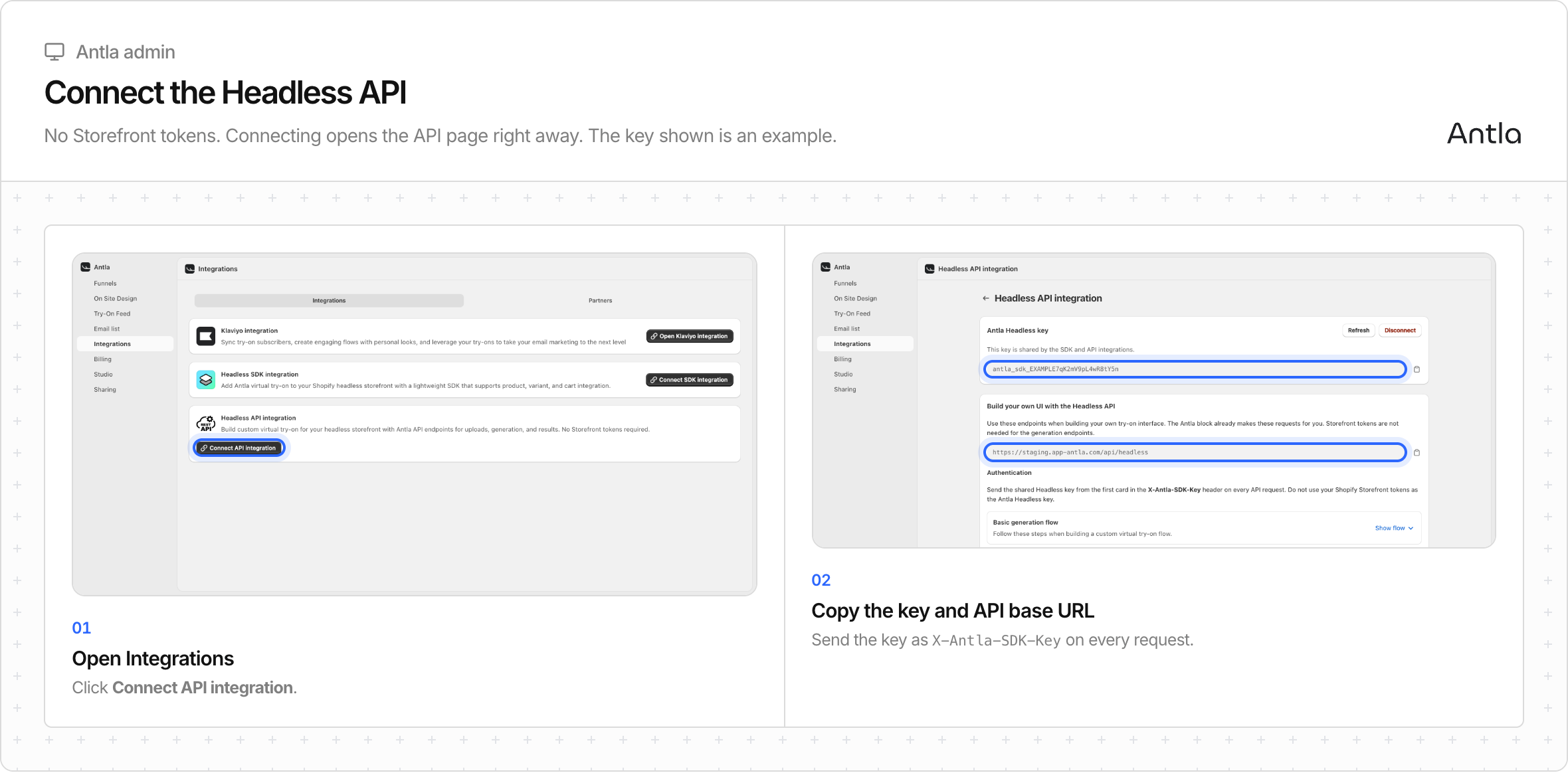
If Headless SDK is already connected, the API card already says Open API integration. The key is the same value. You do not connect twice.
The base URL is {SHOPIFY_APP_URL}/api/headless. Examples on this site use https://app-antla.com/api/headless. Copy the exact URL from that merchant’s installation if it differs.
2. Authenticate
Section titled “2. Authenticate”curl --fail-with-body \ -H "X-Antla-SDK-Key: YOUR_ANTLA_SDK_KEY" \ -H "Content-Type: application/json" \ "https://app-antla.com/api/headless/funnel?funnelIds=1"The header name is X-Antla-SDK-Key even on an API-only shop. Do not send Storefront tokens as that header. Do not use Authorization: Bearer.
A 200 funnel response or a 404 with no matching funnel proves the key is accepted. That is not a generation test.
3. Skip /context on API-only
Section titled “3. Skip /context on API-only”GET /context requires Headless SDK. API-only shops receive HTTP 403 SDK_NOT_CONFIGURED. Load products from your catalog. Parse antla_in_funnel_<id> tags there.
If you also connected the SDK, /context works and returns the public Storefront token. That is optional for generation.
4. Generate
Section titled “4. Generate”Follow Custom UI workflow. In short:
- Resolve a Funnel ID from product tags.
GET /funnelis optional validation. POST /uploadsand PUT the photo, or use a public image URL you host.POST /generationsonce. SavejobId.- Poll
GET /generations/{jobId}untilREADYorERROR. - Add to cart with Shopify’s Storefront Cart API if the shopper is buying.
Antla selects the garment image from the variant or product. Your request supplies the shopper photo.
5. Keep setup in sync
Section titled “5. Keep setup in sync”Refreshing the Headless key invalidates the old key for the API and the SDK at once. Disconnecting API is blocked while the SDK is still connected. Disconnect the SDK first, or keep API on when you disconnect the SDK.
Done when
Section titled “Done when”The key authenticates. A tagged product resolves to a Funnel. A test generation polls to a final image. Cart works only if your app implemented Shopify cart. Then run the launch checklist.