

AI Size Recommendation vs Virtual Try-On on Shopify
Size apps pick a label. Virtual try-on shows the garment on you. Compare Shopify tools, return reasons, and when to run both. Listings checked 7 Oct 2026.

Size recommendation apps pick a label from measurements or a quiz. Virtual try-on shows the garment on the shopper. They cut different return reasons. Antla is Shopify photo try-on for how a piece looks; it has no size chart of its own and sits next to any size app you already run.
A denim page does not have one doubt on it. It has two, stacked. One is arithmetic: 28 or 30. The other is a mirror: will this rise sit like the studio shot, or like the last pair that came back.
A quiz can finish the first. It cannot finish the second. A photo preview can finish the second. It will not tell you the waist measurement. Buying the wrong category of app leaves the expensive half of the file untouched.
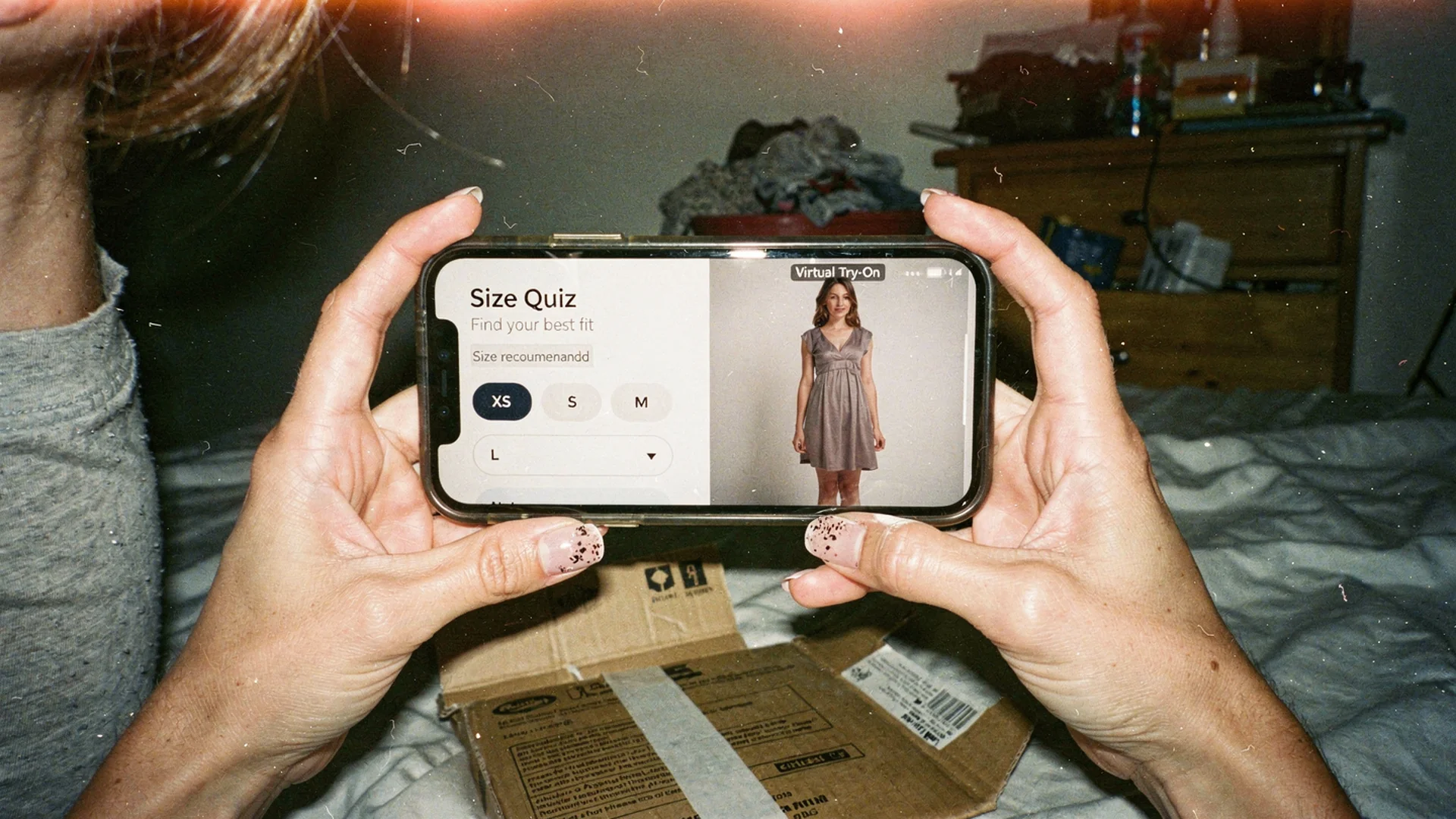
A size tool answers which label to tap. A try-on answers how the garment sits on that body. Most fashion pages need both, in different places.
The shopper is not asking one question
“Will it fit” sounds like a single worry. On apparel it is two questions that share a warehouse tag.
Which size should I order? That is a mapping problem. Height, weight, usual size, garment measurements, stretch, intended ease. The output is S, M, 30, UK 10. If your charts are honest, a recommendation engine can shorten that path.
How will this look on me? That is a picture problem. Shoulder line, hem against the ankle, coverage when she sits, color against her skin, whether a square neck feels severe on her frame. Two shoppers can receive the same recommended medium and disagree completely about the silhouette.
Baymard’s apparel and accessories research treats those as separate UX jobs: conveying fit and feel, including international size guides, is not the same work as product visuals.
I’d start from the return export, not the demo. Demos are designed to look complete. Your tags are not.
What comes back: a size label or a picture of you
| Size recommendation | Virtual try-on | |
|---|---|---|
| Question it answers | Which catalog size should I order? | How will this garment look on me? |
| Typical input | Height, weight, measurements, usual size, sometimes order history | One shopper photo, or a 3D avatar built from body data |
| Output | A label, sometimes with a confidence note | An image of the shopper (or an avatar) wearing the SKU |
| Helps when | Charts are true and the shopper is between sizes | Photography cannot answer the mirror question |
| Does not do | Show drape, length on this body, or coverage | Measure the body or guarantee a size |
| Failure mode | Bad garment data, guessed shopper inputs | Weak product photos, copy that pretends the preview is a fitting |
Call the buttons what they are. “Find my size” should open a size tool. “Try it on” should open a preview. Labels like “See your fit” promise a measurement the image does not make. Placement detail lives in try-on and size selector order.
Return tags that file as “size” and aren’t
Shopify’s 2026 ecommerce returns guide (updated 23 September 2026) cites the NRF and Happy Returns 2025 landscape: an estimated 19.3% of online sales came back that year, against 15.8% for retail overall. Apparel sits above that because fit is hard to judge on a screen. Shopify names fit or sizing as a primary apparel reason, then the usual response: detailed size guides, model measurements, and images that show how the garment actually fits.
The same guide defines bracketing: the shopper buys several sizes intending to keep one. That is a fitting room you paid to ship. It is not the same as someone who ordered the recommended size and still hated the shape.
Split the file before you buy anything:
| Dominant reason on the SKU family | Tool that can actually move it |
|---|---|
| Too small / too big / between sizes | Honest garment measurements, then size recommendation |
| Ordered two adjacent sizes, kept one | Size recommendation plus a one-size incentive cleanup |
| Didn’t look like the photo / not as expected | Better photography, fit notes, visual try-on |
| Wrong length, too revealing, didn’t suit me | Visual try-on, model context, review prompts |
| Defect, damaged, wrong item | QC and fulfillment. Not a fit app. |
| Mix of label and look (dresses, denim, tailoring) | Both layers on the same product page |
A blazer returned as “too small” is often a shoulder that looked sharp on the model and boxy on the shopper. The label may have been right. The picture was not. For the operational split, see how to reduce size-related returns. Charts that omit ease, rise, or torso length still fail after you add AI; that argument is in why size charts fail on Shopify fashion.
Shopify apps in each lane (7 October 2026)
Prices, plan names, and feature bullets below were opened on the Shopify App Store on 7 October 2026. They change. Recheck the listing before you install. Empty cells mean the listing did not state it clearly enough to fill without guessing.
| App | Lane | Shopper input (listing) | Entry paid plan | Source |
|---|---|---|---|---|
| Antla | Visual try-on only | One photo | $19.99/month (Trend: 100 try-ons, then $0.16). 7-day trial. No free plan. | App Store and antla.io/pricing, 7 October 2026 |
| Kiwi Size Chart & Recommender | Size charts; AI size rec on higher plans | Charts plus optional recommender | $7.99/month (Premium, charts). Size recommenders from $14.99/month (Plus). Free plan: 3 charts. | App Store, 7 October 2026 |
| Smart Size Chart & Size Guide | Size charts; “Find my size” quiz on a higher plan | Charts; quiz on the $19/month plan | $9/month (Starter, 10 charts). Find my size is on the $19/month plan. Free: 2 charts. | App Store, 7 October 2026 |
| True Fit: AI Size Guidance | Size recommendation | Listing: size recs from shopper and catalog data | $1,000/month (covers up to 150k annual orders) | App Store, 7 October 2026 |
| Robosize: AI Try-On & Fit | Both | Height, weight, and age for size; try-on of the garment on the body | $9.99/month (50 try-on sessions). Free plan: 4 size charts. | App Store, 7 October 2026 |
| Rendered Fits Virtual Try On | Both | Fit profile once; size from each product’s chart; optional photo try-on | $349/month (1,000 try-ons). Free: 1 product, 5 try-ons. | App Store, 7 October 2026 |
| AI Frame | Both | Height and weight for “Your size”; photo for try-on; built-in charts | $19.99/month (80 try-ons). Free: 10 try-ons, 10 charts. | App Store, 7 October 2026 |
| OptiDress | Both (3D avatar, no photo) | Height, weight, body shape | $24.99/month (150 try-ons). Free: 10 try-ons/month. | App Store, 7 October 2026 |
Third-party roundups dated mid-September 2026 still list True Fit around $49/month. The live listing on 7 October 2026 is $1,000/month. Use the App Store, not the roundup.
Apps that do both are still doing two jobs. A 3D avatar is not a photograph of the shopper. A photo try-on is not a size. Test both outputs on your catalog.
Sizebay’s App Store listing is a tracking pixel, not a size or try-on app, so it is not in the table.
Antla is visual try-on, not a sizer
OptiDress’s Shopify try-on comparison (figures checked 19 September 2026) puts Antla in the “shows the garment, does not document a size recommendation” group. That read is correct.
The listing says it in one line: size charts tell customers what fits; Antla shows them how it looks. Another bullet says it works with size charts, unit converters, and sizing templates. That means it pairs with those tools. It does not ship a chart, a unit converter, or a recommended size.
Antla has no size chart or size recommendation of its own. It works alongside any Shopify size app.
That is a product choice, not a missing checkbox. Recommending a size from a single photo has a real error rate: angle, clothes already on, posture, lighting. A shopper who guesses medium and is wrong can still recover. A store that told her medium owns the ticket.
Virtual try-on is the visualization layer: the shopper uploads one photo in the browser, sees the garment on herself, and adds to cart if the picture holds. No shopper app to download. Per Antla’s privacy policy, Images are deleted and not accessible within 72 hours.
Antla is Built for Shopify certified. It is not SOC 2 or ISO certified.
Shoppers who complete an Antla preview convert at 3.8% across more than 500,000 try-ons. That is a try-on-user cohort rate, not store-wide conversion, and not a claim that try-on cut returns by a published percentage. Method and caveats are on Shopify virtual try-on conversion. Antla has not published a confirmed first-party return-rate split for try-on users versus non-users. Measure yours.
Two buttons, two jobs
On dresses, denim, and tailoring, most stores need both layers.
- Fix the chart. Garment measurements next to the selector. Rise and inseam on denim. Shoulder and body length on blazers. Bust, waist, and length on dresses. “True to size” is not a measurement.
- Keep size help on the selector. Chart, quiz, or recommender. One control. One job.
- Put try-on on the gallery or just after color. The shopper should preview the colorway she picked. The result is a picture, not a size.
- Do not merge the CTAs. A combined “See your fit” button hides the size tool from people who needed a label and hides the preview from people who needed a picture.
Setup for the try-on block is in how to add virtual try-on to Shopify. If the file is mostly look, not labels, that is the layer to add first.
A combo listing that “covers both” is still two jobs. Test the size output and the visual output on your SKUs. A weak recommender plus a weak preview is worse than one strong tool next to an honest chart.
Start from the return file, not the demo
Export 60 to 90 days of returns on your top ten SKU families. Split too-small / too-big from not-as-expected, quality, and changed mind. Then:
- If label errors dominate and the charts are already specific, test a size-recommendation app on those families.
- If look errors or bracketing dominate, test photo try-on on those families.
- If both show up on the same dresses or denim, run both, with separate buttons.
- Hold placement constant for four weeks. Compare users of each tool against non-users on conversion, units per order, bracket rate, and returns 30 days after delivery. Read again at 60 to 90 days so late parcels land. Do not treat a try-on-user return rate as store-wide.
If shipping damage or defects lead the file, skip the fit stack until those are boring. Evidence for preview as a returns lever, without invented Antla percentages, is in does virtual try-on reduce returns?.
What this costs on 7 October 2026
Size-chart apps on the table start with a free plan. Paid chart tiers start around $8 to $9/month. The AI “find my size” layer is often a higher SKU: Kiwi Plus at $14.99/month, SmartSize at $19/month. True Fit’s listing is $1,000/month.
Antla pricing, opened 7 October 2026, matching the App Store:
- Every plan includes a 7-day free trial. There is no free plan.
- Trend: $19.99/month. 100 try-ons to start, then $0.16 each.
- Runway: $49.99/month. 500 try-ons to start, then $0.12 each. Full customization, priority support, custom events, Klaviyo.
- Unlimited Fashion: $199.99/month. 2,000 try-ons to start, then $0.09 each. Priority generation, dedicated support, customer success manager, dedicated server.
The pricing page lists Klaviyo on published plans. The App Store names Klaviyo on Runway and Unlimited Fashion. Trend’s App Store feature list says “Full Sharing Customization” and does not name Klaviyo.
Frequently asked questions
What is the difference between AI size recommendation and virtual try-on?
Size recommendation maps body or purchase data to a catalog label. Virtual try-on renders the garment on the shopper, usually from a photo or a 3D avatar. One answers “which size.” The other answers “how will it look on me.” They are not substitutes.
Do I need both a size recommendation app and virtual try-on on Shopify?
On low-variance basics with honest charts, a size tool may be enough. On dresses, denim, swim, and tailoring, most stores need both: a label for the selector and a preview for the mirror question. Fix chart truth first, then add layers one at a time and measure.
Which one reduces apparel returns more?
It depends which reason actually leads your file. Recommendation helps wrong-label returns when the charts are true. Try-on helps visualization and bracketing returns when shoppers cannot picture themselves. Export tags before you choose. Antla has not published a confirmed return-rate delta.
Does virtual try-on show whether clothes will fit?
No. It shows length, silhouette, coverage, and color on the shopper. It does not measure the body or guarantee a size. Keep garment measurements and a size chart or size-recommendation app next to the selector.
Does Antla recommend a size?
No. Antla has no size chart or size recommendation of its own. It is visual try-on and works alongside any Shopify size app, including Kiwi, SmartSize, and True Fit.
Can I keep my current size chart app if I add Antla?
Yes. That is the intended setup. Size help stays on the selector. Try-on stays on the gallery. Do not merge them into one “fit” button.
See the try-on next to a size selector: Antla.io/demo
Related: Virtual try-on vs size charts · Why they’re not the same thing · The cost of bracketing · Rise and length on denim · Shopify apps that reduce fashion returns · Reduce bracketing orders
About the author: Aaron founded Antla. Merchants keep buying a second size quiz when the return comment says the dress looked different on them. Size tools pick a label. Try-on shows the picture. Fashion product pages usually need both, and they are not the same app.